

Key benefits
- Scalable solution that allows users to fully optimize their shipping processes, so your merchants won’t outgrow your marketplace as their order volume increases
- Allows merchants with a direct carrier contract to ship on their pre-negotiated rates
- Merchants can market their brand through customizable tracking notifications, and the Return portal
- Sendcloud will support merchants with questions related to shipping, integrations and invoices
- Low-cost, low effort integration
- You don’t have to worry about billing or building shipping label purchasing into your UI, because Sendcloud will invoice merchants directly for any labels they create
How does it work?
- A decentralized setup means that every merchant on your platform will need to have their own Sendcloud account.
- When an order is placed in the marketplace, it will be imported into Sendcloud via the merchant’s API credentials.
- The merchant will log into their account and process the order into a shipping label via the Sendcloud UI. Once the order is processed in Sendcloud, the merchant downloads and prints the label, and attaches it to the box.
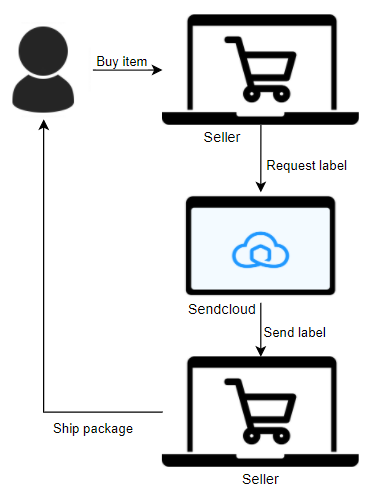
Decentralized integration setup
Each merchant will need to sign up for their own Sendcloud account. Once an account has been made, they can create an API integration in the Sendcloud panel to create their unique API keys. Once they create their API keys, they can enter these into the relevant fields in your marketplace UI to create the connection. To make this process easier, this can be done by redirecting the merchant to a webpage which will prompt them to allow access for the integration, allowing you to make API calls on their behalf. Merchants need to complete the following steps to obtain their API keys:- Log in to their Sendcloud account
- Navigate to Settings > Integrations
- Find the Sendcloud API integration in the list and click Connect
- Enter a name for the integration, such as the name of the marketplace, and click Save
- The form will auto-complete with their API credentials. Your API Public and Private key will be used to authenticate your API requests to Sendcloud. You must include these in the
Authorizationheader for all your requests to our APIs. - To enable a webhook feedback loop, enter the webhook URL in the designated field and check the box “Webhook feedback required”.
- (Optional) Enable service point delivery, as well as the carriers you want to use for this delivery option.
API credentials are private and must not be shared with anyone.
How to create shipping labels
To create shipping labels via a decentralized integration model, you need to make a request to the Create a parcel or parcels endpoint. When you make the request, you should authenticate by passing the API keys of the merchant. This will ensure that orders you create via the integration will appear in the individual merchant’s Sendcloud panel. For full details on the data you can include in your request, refer to the Create a parcel or parcels endpoint documentation.Note that the response does not contain either tracking information or a URL
to access the shipping label. This is because the order must still be
processed directly via the Sendcloud panel before it will be announced with
the carrier.Read our help center guides on how to process orders and print labels through the Sendcloud panel.
Important: the request_label field
Via a decentralized flow, orders should be imported into the merchant’s Sendcloud panel without creating a shipping label. This is to allow merchants the flexibility to make adjustments to orders, such as changing the shipping method, before processing them into labels.
You will need to pass the following argument, in addition to the required fields: "request_label": false. The order will now correctly appear in the merchant’s incoming order overview in Sendcloud.
Shipping to a service point
If you want to create a parcel to ship to a service point, you’ll need to retrieve a list of service points and include a correspondingservice_point_id in your request.
Service points for marketplaces
Learn how to offer service point delivery to your merchants and their customers.
Additional functionalities
Connect carrier contracts
Sellers with high order volumes will often have their own contracts with their preferred carriers to ensure they get the best possible rates on their shipping labels. An integration with Sendcloud means you don’t have to worry about your biggest customers outgrowing your marketplace—they can connect their contracts directly to their Sendcloud account, and they’ll be invoiced directly by their carrier for any labels they create.Carrier contracts
Learn how to use your own carrier contract in our help center.
Tracking
Merchants can upload their brand assets in Sendcloud and use them to personalize tracking notifications and a custom tracking page to replace the website of the shipping carrier. Tracking notifications are an unmissable banding opportunity for sellers looking to grow brand awareness and encourage return sales.Tracking
Learn about Sendcloud’s automated tracking features in our help center.
Return portal
Sellers can take advantage of a customizable, Sendcloud-hosted return portal, which allows both the merchant, and their customers, to validate returns and download return shipping labels. The return portal also allows merchants to charge for returns, so savvy online retailers won’t be out of pocket when customers request returns.Return portal
Find out how to set up your own return portal in our help center.
Multi-carrier shipping options
Sendcloud connects our users to 80+ domestic and international carriers, resulting in a huge and diverse portfolio of shipping methods which sellers can, in turn, offer to their customers. By integration with Sendcloud via this setup, you won’t have to consider which rates and methods to offer to your sellers, as they’ll have the flexibility to define their own customer journeys.Carriers
Read more about Sendcloud’s carrier offering.
International shipping options and customs documents
Sendcloud will automatically generate customs documents alongside the label when your merchants ship an order to a destination outside the EU. The merchant needs to provide some additional information in their account settings, and include additional parcel item information.International shipping
Read guidance on handling international shipping in our help center.
Automated order processing with shipping rules
Shipping rules help users to customize their workflow and save time, money and energy by automating every-day decisions about how to process orders.Shipping rules
Learn how to set up and use shipping rules in our help center.