

Key benefits
- Future-proof and scalable solution for merchants increasing in parcel volume
- The two integrations can be managed separately, so if you already have a centralized or decentralized set-up you can implement a hybrid solution at a later stage if required
- You’ll be able to capitalize on branding opportunities via tracking notifications via the centralized workflow
- Offers the most flexibility for sellers
- Easily onboard new or inexperienced sellers
How does it work?
As this integration involves two separate setups, you can follow the guidelines for a centralized and decentralized setup to build the two integrations independently. See: Centralized integration guidelines and Decentralized integration guidelines. Merchants will be able to follow either the decentralized flow and use their own Sendcloud account (indicated by the red path in the diagram below), or a centralized flow (blue path).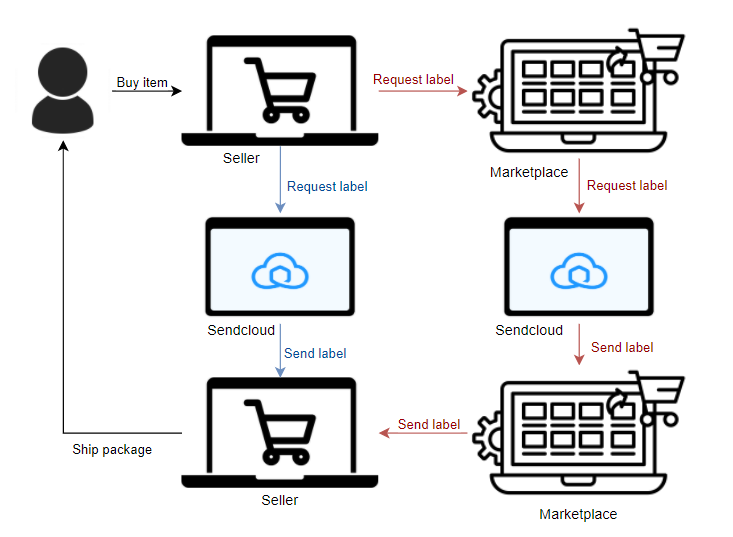
- Their own Sendcloud account to purchase labels
- The marketplace’s central Sendcloud account
Option 1: Merchant uses their own Sendcloud account
A decentralized setup means that every merchant on your platform will need to have their own Sendcloud account.- When an order is placed in the marketplace, it will be imported into the Sendcloud account of the individual merchant via their unique API credentials.
- The merchant will log into their account and process the order into a shipping label via the Sendcloud UI.
- Once the order is processed in Sendcloud, the merchant downloads and prints the label, and attaches it to the box.
- They will be invoiced directly by Sendcloud for shipping labels they create.
Option 2: Merchant uses the marketplace’s central Sendcloud account
At the point of sale, merchants will be able to purchase a label for a completed order directly from your platform. Optionally, you can provide multiple shipping options for your merchant to choose from, based on the size and form of the packaging or parcel weight.- The marketplace will request a label via an API call using its own Sendcloud account credentials
- The label is returned to the marketplace, to be presented to the merchant
- The merchant downloads the shipping label, prints it and attached it to the box
- Sendcloud will charge you, the marketplace, for all labels you create via the central Sendcloud account
- You can decide how and when to bill your merchants. Some examples are included in the documentation for the Centralized setup under How do I charge my merchants for shipping labels?
Hybrid integration setup
The setup for a hybrid model will require you to build and offer two separate flows to the merchant:Decentralized setup
Each merchant will need to sign up for their own Sendcloud account.- Once an account has been made, they can create an API integration in the Sendcloud panel to create their unique API keys.
- Once they create their API keys, they can enter these into the relevant fields in your marketplace UI to create the connection.
- To make this process easier, this can be done by redirecting the merchant to a webpage which will prompt them to allow access for the integration, allowing you to make API calls on their behalf.
Decentralized integration guidelines
Read the in-depth guide on setting up a decentralized integration with Sendcloud
Centralized setup
To enable merchants to purchase labels directly from your platform, you will need to create a single Sendcloud account, which will be accessed only by marketplace employees. This account will be used to process all orders and create labels for merchants who purchase labels directly from the marketplace. To begin, sign up for a Sendcloud account. This is your main account, which you use to make API calls to retrieve shipping labels. As you will allow your users to request labels directly from the marketplace, they are not required to create their own accounts.Centralized integration guidelines
Read the in-depth guide on setting up a centralized integration with Sendcloud