

Key benefits
- You have full oversight of all shipping activities
- Sendcloud operates in the background, so merchants won’t have to leave your platform to create their labels
- Ideal setup for C2C marketplaces, or for marketplaces which host sellers who ship low volumes of orders per month, on an ad-hoc basis
- You can enable customizable tracking emails to increase brand exposure
- You decide how and when to charge merchants for their shipping labels
- Quickly onboard new sellers and provide an easy means for them to print labels
- You can offer multiple shipping options, including delivery to service points
How does it work?
- Through a centralized setup, you will provide the option to purchase a shipping label through your marketplace at the point of sale
- Optional: You can provide multiple shipping options for your merchant to choose from, based on the size and form of the packaging or parcel weight
- The marketplace will request a label via an API call using its own Sendcloud account credentials
- The label is returned to the marketplace, to be presented to the merchant
- The merchant downloads the shipping label, prints it and attaches it to the box
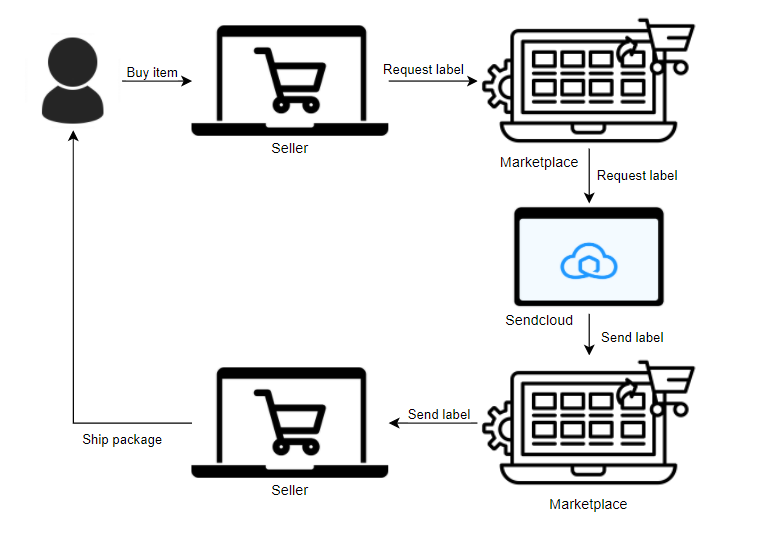
Centralized integration setup
To begin, sign up for a Sendcloud account. This is your main account, which you or your marketplace employees will use to make API calls to retrieve shipping labels for your users. Merchants are not required to have their own Sendcloud accounts, and no input is required from them to create the integration. Then, create an API integration in your Sendcloud account:- Log in to your Sendcloud account
- Navigate to Settings > Integrations
- Find the Sendcloud API integration in the list and click Connect
- Enter a name for the integration, such as the name of your platform, and click Save
- The form will auto-complete with your API credentials. Your API Public and Private key will be used to authenticate your API requests to Sendcloud. You must include these in the
Authorizationheader for all your requests to our APIs. - To enable a webhook feedback loop, enter the webhook URL in the designated field and check the box “Webhook feedback required”.
- (Optional) Enable service point delivery, as well as the carriers you want to use for this delivery option.
Your API credentials are private and must not be shared with anyone.
How to create shipping labels
With a centralized integration type, you need to provide your merchants with a way to request a shipping label for a completed order. This is done by making an API call to the Create a parcel or parcels endpoint.1
Create the parcel and request the label via the API
You’ll need to include information about your merchant’s sender address and the end-customer’s address information in your API call.If you want to create a parcel to ship to a service point, you’ll also need to retrieve a list of service points and include a corresponding In order to retrieve a shipping label at the same time as you create the
parcel in the Sendcloud system, you need to pass the argument
service_point_id in your request.Service points for marketplaces
Learn how to offer service point delivery to your merchants and their
customers.
"request_label": true. When this field is set as true, a URL containing
the shipping label will be returned along with the parcel information in the
response.For full details on the data you can include in your request, refer to the
Create a parcel or
parcels endpoint
documentation.2
Retrieve the label URL
The response will contain a URL which links to the shipping label. You’ll
need to provide your API keys to access the label, as with all API requests.Shipping labels can be downloaded in various sizes and formats, including
PDF format and sizes suitable for a standard or label printer. This is
explained in more detail in the Labels API
documentation.
3
Present the label to your merchant
You can now present the label to your merchant to download, print and attach
to their box.
Tip: The response also includes a tracking number for the parcel, which can be shared with both the merchant and the buyer. If Tracking emails have been enabled in your Sendcloud account, the buyer will receive tracking emails to inform them about the status of their delivery. Find out more about Tracking parcels via the API.
Additional functionalities
Sendcloud APIs allow you access to the internals of our platform, including our host of shipping-oriented features. You can decide which of our features you want to build into your integration. Depending on your unique business model and the extent to which you want to support your merchants; shipping activities, you could consider implementing some of the following features:Tracking
A centralized integration model provides a unique marketing opportunity by way of branded tracking notifications. Build out your brand in the Sendcloud panel and enable tracking notifications to have customers receive timely delivery updates, customized with your branding. You can also customize a Tracking Page which customers will land on when they click the tracking URL in the notification. Tracking pages let you promote your social media presence via our Instagram widget, and you can insert your latest campaign through promotional banners.Tracking overview
Learn how to integrate tracking into your marketplace.
Tip: You can make use of webhooks to proactively push tracking information through to your customers. See our
webhook documentation.
Return portal
Provide an easy way for merchants to generate return labels via a customizable Return portal. View our documentation to see how you can build your own version of the Return portal to incorporate return label creation into your workflow.Return portal
Learn how to build your own version of the return portal.
Service point delivery
We make it easy for you to enable service point delivery methods and allow your merchants to ship parcels to a location that’s convenient to the end-buyer. Read the Servicepoints for marketplaces page to understand the steps involved, and see an example of how you can build a service point location picker into your checkout.How do I charge my merchants for shipping labels?
Sendcloud will charge your account for labels you create on behalf of your sellers. This gives you the flexibility to define your own customer journey, and decide how and when you will charge your users for their labels. Some options to consider for your billing model include:Connect your direct carrier contracts
Connecting your direct carrier contracts helps you to keep your shipping rates as low as possible, so you can transfer the benefits to your users while shipping on your pre-negotiated rates.Connect a carrier contract
Learn how to connect your direct carrier contracts to Sendcloud.
Offer multiple shipping options to your merchants
A choice of shipping methods gives both your merchants, and their end-customer, the flexibility to choose a delivery method and service level that suits them best. You can retrieve rates directly via the Sendcloud API for all our supported shipping methods, so you can price shop regularly to make sure you’re getting the best possible rates.Shipping methods
Learn how to get an up-to-date list of shipping methods via the API.
Shipping rates
Learn how to retrieve shipping prices from the API.
Simplify shipping decisions with flat-rate or free shipping
If you want to make the lives of your merchants as easy as possible, you can simply offer a flat fee for parcels that fall within specific weight brackets. This is the easiest billing method that also saves you in development costs. Some popular online marketplaces let their merchants select a parcel form, (e.g., letterbox parcel, small box, large box, etc.), and then present a flat fee for the parcel, based on their selection and delivery method (standard or service points delivery). Offering free or discounted labels to your merchants based on how much they ship per month is another great way to improve your customer retention rates.Turn shipping into a profit generator
When you ship through Sendcloud, you’ll receive discounts on shipping label prices based on the amount of parcels you ship. You could decide to gain extra margin on your rates by offering them to merchants with a percentage or flat fee markup. Alternatively, consider offering discounted shipping to customers who have a higher subscription plan as an incentive.Transfer shipping costs directly
And finally, you could simply choose to present shipping costs directly to your merchants based on the price you pay in Sendcloud or via your carrier contract. If you opt for this solution, you can retrieve up-to-date shipping prices for specific shipping methods, and build it into your marketplace UI.Shipping rates
Learn how to retrieve shipping prices from the API.