

What is multicollo?
Multicollo is a feature that allows sending multiple parcels to be shipped and delivered simultaneously at a higher chance of lower costs by supported carriers. It is handy for merchants who usually send bulky items (e.g. bicycles, gym stations) or different items purchased together that do not fit in one parcel. In this context, a shipment is a group of parcels that are announced together, and each parcel has its own items and shipping label. All multicollo parcels must be sent from the same sender address to the same destination address.Creating multicollo shipments
Multicollo shipments can be created using the Sendcloud Shipments API (v3) or manually in the Sendcloud platform (learn more in our help center). If you are currently using the legacy Parcels API (v2), see the migration section below. Using the Shipments API allows you to provide detailed parcel information such as weight, dimensions, and items for each parcel in the shipment. Providing more accurate parcel details ensures a smoother shipping process, reduces the chance of unexpected carrier surcharges, and may reduce shipping costs depending on your carrier contract and rates.Some carriers currently support multicollo shipments only via the Sendcloud platform or legacy APIs. See the
supported carriers section below for details.
Creating multicollo shipments via the Shipments API
Use the Create and announce a shipment asynchronously endpoint to create and announce a multicollo shipment asynchronously. For each parcel in a multicollo shipment, add a separate object to theparcels array in your request.
We recommend providing weight and dimensions info per parcel to avoid potential carrier surcharges.
- Use the Retrieve a shipment endpoint to check the announcement results
- Use the Retrieve a parcel document endpoint to retrieve the labels
Supported carriers
Not all carriers support multicollo shipments. To retrieve shipping options that support multicollo shipments, use the Shipping options API and make aPOST request with {"functionalities": {"multicollo": true}} in the body.
The response returns shipping options that support multicollo shipments.
Currently international multicollo shipments are only supported in API v3.
Some restrictions apply to multicollo shipments. See our help
center for more
information.
Multicollo labels
The shipping label will reflect the total number of parcels in the consignment and, depending on the carrier, each parcel’s position in the shipment (for example: 1/3, 2/3, 3/3). Each parcel will have a unique tracking number, but the customer will only receive one tracking email for the entire shipment.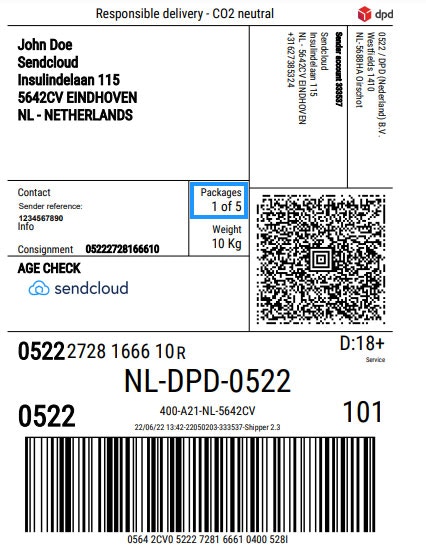
Avoid being charged for unused multicollo shipments
If you create a shipment using this API but decide not to ship it, you can avoid being charged by using the Cancel a shipment endpoint. When a multicollo shipment is canceled, all labels from that shipment become canceled.Finding the shipping_option_code
Make a request to the Create a list of shipping options endpoint.
The top-level code field in each shipping option object is the shipping_option_code to be used with the Shipments API. In the example response below, the value dpd:home is the shipping_option_code used in the ship_with field when creating a shipment:
Response body
Migrating from the Parcels API (v2) to the Shipments API (v3)
If you previously created multicollo shipments using the Parcels API (v2), you can migrate to the Shipments API (v3) to benefit from improved multicollo functionality. Key differences:- Parcels API (v2): Multicollo shipments were created by specifying the number of parcels in the quantity field.
- Shipments API (v3): Each parcel is defined individually inside the parcels array.
- Use the Create and announce a shipment asynchronously endpoint instead of the Create a parcel or parcels endpoint
- To find a
shipping_option_codefor use in theship_withfield for the Shipments API, you can use the Create a list of shipping options endpoint- Also, if you have a direct contract with the carrier, you can add the
contract_idto the request body (the id can be obtained through the Retrieve a list of contracts endpoint)
- Also, if you have a direct contract with the carrier, you can add the
- Update your payload to match the expected request body in the Create and announce a shipment asynchronously endpoint
- For multicollo, the main change is that instead of specifying a
quantitywhen creating a parcel, you can now specify each parcel’s details by adding a separate parcel object in theparcelsarray for each parcel in your multicollo shipment.
- For multicollo, the main change is that instead of specifying a